
My site is showing Page Not Found after deployment
GreenStack runs on Linux containers, which - unlike Windows or Mac - treat file paths as case-sensitive. A site that renders fine locally can return Page Not Found once deployed if the casing of a file or hostname doesn’t match exactly.
There are two common causes:
1. View filenames don’t match the Document Type alias casing
Section titled “1. View filenames don’t match the Document Type alias casing”This is the most common cause. Umbraco resolves a View by looking for a .cshtml file whose name matches the Document Type alias. On Windows or Mac this match is case-insensitive, so home.cshtml will resolve a home document type. On Linux it will not.
You can find the Document Type alias in the backoffice:

Check that every file under Views/ matches that casing exactly. In the example below, Home.cshtml and Page.cshtml both start with a capital letter and would fail to resolve against lowercase home and page aliases on Linux:
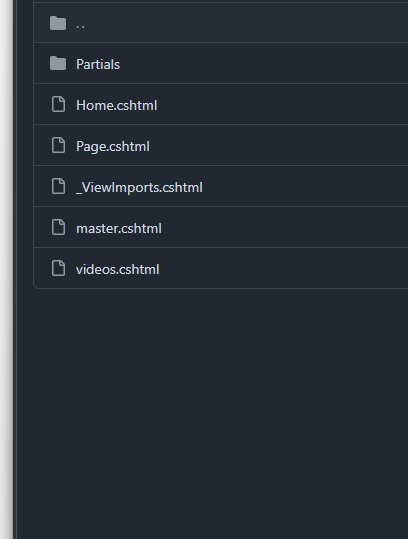
So if the backoffice shows the alias as home, the View must be:
Views/home.cshtmlnot:
Views/Home.cshtmlThe same applies to any other Views, including Page.cshtml, master.cshtml and any custom templates.
2. The site’s hostname is not assigned in Culture and Hostnames
Section titled “2. The site’s hostname is not assigned in Culture and Hostnames”If the site is multilingual, or has been built in a way that requires hostname-based routing (for example, multiple sites within a single Umbraco install), the deployed hostname must be assigned to the root content node.
In the backoffice, right-click the root node of the site and choose Culture and Hostnames, then add the hostname the site is being served on. Without this, Umbraco cannot resolve the incoming request to a content node and will return Page Not Found.